웹뷰 레이어 구조 상에서의 캐시
FrontEnd | | 34분 읽기

캐시의 종류
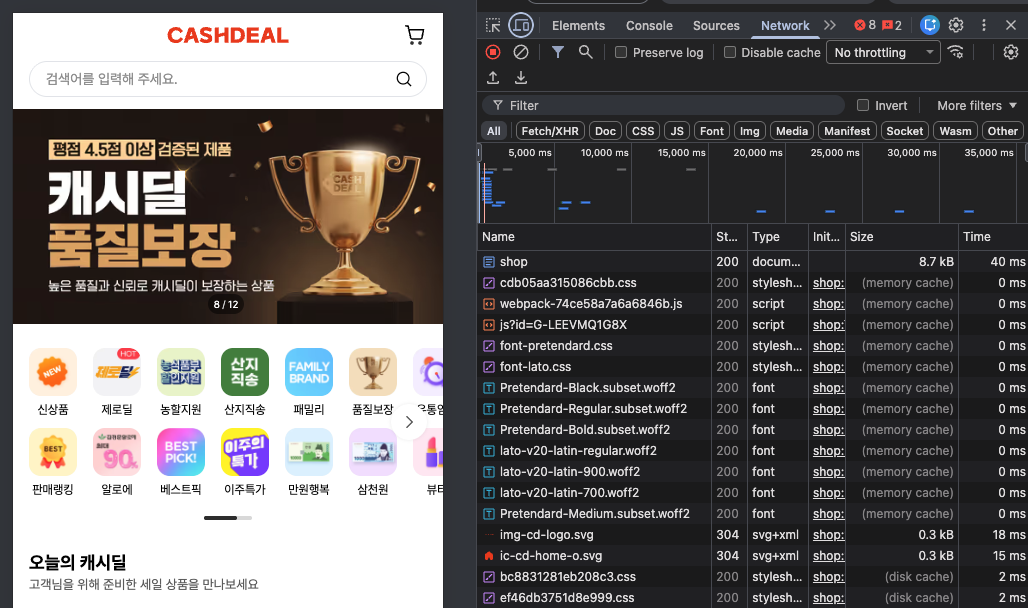
메모리 캐시 (Memory Cache)
위치: RAM (컴퓨터/폰의 메모리)
속도: 밀리초 단위
생명주기: 앱이 켜져있는 동안만 유지, 앱 종료하면 사라짐
예시: 크롬 → Blink in memory cache
For Chrome, there is another cache in the rendering engine Blink that stores images, styles, scripts and fonts (maybe more) in memory.
This cache is used for consecutive navigations on a site. Resources delivered from the Blink cache are tagged with
(from memory cache)in the network tab. Resources served from the browser cache are tagged with(from disk cache).
디스크 캐시 (Disk Cache)
위치: 스마트폰/컴퓨터의 저장 공간
속도: 메모리보다 느림 (하지만 네트워크보다 빠름)
생명주기: 앱을 껐다 켜도 유지, 캐시 설정에 따라 며칠 ~ 몇 주 유지
The HTTP Cache is the module that receives HTTP(S) requests and decides when and how to fetch data from the Disk Cache or from the network. The cache lives in the browser process, as part of the network stack. It should not be confused with Blink's in-memory cache, which lives in the renderer process and it's tightly coupled with the resource loader.
HTTP 캐시는 HTTP(S) 요청을 수신하고 디스크 캐시 또는 네트워크에서 데이터를 가져올 시기와 방법을 결정하는 모듈입니다. 이 캐시는 네트워크 스택의 일부로 브라우저 프로세스 내에 존재합니다. 렌더러 프로세스에 존재하며 리소스 로더와 긴밀하게 결합된 Blink의 인메모리 캐시와 혼동해서는 안 됩니다.
https://dev.to/csjcode/ultimate-caching-guide-3-browserchrome-37h1
⇒ Types of Caching in Chrome
웹뷰의 레이어 구조와 캐시 위치
Android WebView
Android 앱 프로세스
https://www.chromium.org/developers/design-documents/multi-process-resource-loading/
"Our multi-process application can be viewed in three layers. At the lowest layer is the Blink engine which renders pages. Above that are the renderer process... Managing all the renderers is the browser process, which controls all network accesses."
우리의 다중 프로세스 애플리케이션은 세 가지 계층으로 볼 수 있습니다. 가장 하위 계층에는 페이지를 렌더링하는 Blink 엔진이 있습니다. 그 위에는 렌더러 프로세스(간단히 말해 탭당 하나씩)가 있으며, 각 프로세스에는 하나의 Blink 인스턴스가 포함됩니다. 모든 렌더러를 관리하는 브라우저 프로세스는 모든 네트워크 접근을 제어합니다.
1. Blink는 코드(렌더링 엔진)
https://www.chromium.org/blink/
"Blink is the name of the rendering engine used by Chromium and particularly refers to the code living under src/third_party/blink."
2. 렌더러 프로세스는 실행 단위
https://www.chromium.org/developers/design-documents/multi-process-architecture/
"The render process renders, animates, scrolls, and routes input for a single site and tab combination. There are several render processes."
3. 렌더러 프로세스 안에 Blink 엔진이 들어있음
https://chromium.googlesource.com/chromium/src/+/master/third_party/blink/renderer
"This section describes a high-level architecture of blink/renderer, which contains most of the Web Platform implementation, and runs exclusively in the renderer process."
→ Blink 코드는 렌더러 프로세스 안에서 실행
"When an Android app embeds WebView, WebView's browser code runs in the app's process (we call this the 'browser process'). This means WebView code shares the same address space.
Android 앱이 WebView를 임베드할 때, WebView의 브라우저 코드는 앱의 프로세스(이를 "브라우저 프로세스"라고 부름) 내에서 실행됩니다. 이는 WebView 코드가 동일한 주소 공간을 공유함을 의미하
WebView follows Chrome's architecture by separating browser and renderer code. WebView's renderer process also runs in the app's context, although this process is sandboxed so it actually has even fewer permissions.
WebView는 브라우저와 렌더러 코드를 분리하는 Chrome의 아키텍처를 따릅니다. WebView의 브라우저 코드는 앱 프로세스 안에서 실행됩니다. Chrome처럼 별도의 "Browser Process"가 있는 게 아니라, 앱 프로세스 자체가 브라우저 프로세스 역할을 합니다.
┌─────────────────────────────────────────────────┐
│   App Process (앱 프로세스)                        │  ← 상위: Browser Process 역할
│   - WebView 1 (페이지 A)                          │
│   - WebView 2 (페이지 B)                          │
│   - WebView 3 (페이지 C)                          │
│   - 네트워크, GPU, UI 관리 (in-process)             │
│                                                  │
│   📦 영구 저장소 관리 (디스크):                        │
│   ├─ localStorage (/app_webview/Local Storage/)  │
│   ├─ Cookie (/app_webview/Cookies)               │
│   ├─ IndexedDB (/app_webview/IndexedDB/)         │
│   └─ 디스크 캐시/HTTP 캐시 (/cache/WebView/)         │
│                                                  │
│   💾 메모리 캐시 (RAM):                             │
│   ├─ sessionStorage (메모리, 프로세스 종료 시 삭제)     │
│   └─ Memory Cache (이미지, CSS, JS 등)             │
└─────────────────────────────────────────────────┘
              ↕ IPC (Inter Process Communication)
┌───────────────────────────────────────────────────┐
│   WebView Renderer Process (1개, 공유)              │  ← 중간: 렌더링 담당
│   - 모든 WebView가 이 Renderer 사용                   │
│                                                   │
│   🔧 렌더링용 임시 메모리:                             │
│   ├─ DOM 트리 (현재 페이지)                           │
│   ├─ JavaScript 힙 메모리                           │
│   ├─ 렌더링 버퍼                                    │
│   └─ 현재 페이지의 리소스 (임시)                        │
│                                                   │
│   ⚠️ 페이지 닫으면 모두 삭제됨                          │
└───────────────────────────────────────────────────┘
                    ↓
              [Blink 엔진]                            ← 하위: 실제 렌더링
              - HTML 파싱
              - JavaScript 실행
              - 페이지 렌더링

→ localStorage 공유됨 ✅
→ 데이터 경로: /data/data/your.app/app_webview/Local Storage/
┌─────────────────────────────────────────────────────────────────┐
│ App Process (앱 프로세스) │
│ │
│ WebView 관리: │
│ ├─ WebView 1 (페이지 A) │
│ ├─ WebView 2 (페이지 B) │
│ └─ WebView 3 (페이지 C) │
│ │
│ 네트워크 & 서비스 (in-process): │
│ ├─ Network Service │
│ ├─ GPU Service │
│ └─ UI Thread │
│ │
│ ━━━━━━━━━━━━━━━━━━━━━━━━━━━━━━━━━━━━━━━━━━━━━━━━━━━━━━━━━━━━ │
│ 📦 영구 저장소 (디스크): │
│ ━━━━━━━━━━━━━━━━━━━━━━━━━━━━━━━━━━━━━━━━━━━━━━━━━━━━━━━━━━━━ │
│ │
│ ├─ 📁 localStorage │
│ │ └─ 위치: /data/data/your.app/app_webview/Local Storage/ │
│ │ └─ 특징: origin별 영구 저장, 앱 삭제 전까지 유지 │
│ │ │
│ ├─ 📁 Cookie │
│ │ └─ 위치: /data/data/your.app/app_webview/Cookies │
│ │ └─ 특징: domain별, 만료 시간까지 유지 │
│ │ │
│ ├─ 📁 IndexedDB │
│ │ └─ 위치: /data/data/your.app/app_webview/IndexedDB/ │
│ │ └─ 특징: 대용량 구조화 데이터 │
│ │ │
│ ├─ 📁 HTTP Cache (디스크 캐시) │
│ │ └─ 위치: /data/data/your.app/cache/WebView/ │
│ │ └─ 특징: 이미지, CSS, JS 등 리소스 (Cache-Control 헤더 따름) │
│ │ └─ 크기: 기본 10-20MB │
│ │ │
│ └─ 📁 Application Cache (Deprecated) │
│ └─ 위치: /data/data/your.app/cache/ (setAppCachePath 설정) │
│ └─ 특징: HTML5 AppCache API (Service Worker로 대체됨) │
│ │
│ ━━━━━━━━━━━━━━━━━━━━━━━━━━━━━━━━━━━━━━━━━━━━━━━━━━━━━━━━━━━━ │
│ 💾 메모리 캐시 (RAM): │
│ ━━━━━━━━━━━━━━━━━━━━━━━━━━━━━━━━━━━━━━━━━━━━━━━━━━━━━━━━━━━━ │
│ │
│ ├─ 🧠 Memory Cache (이미지, CSS, JS 등) │
│ │ └─ 특징: 빠른 재사용, 프로세스 종료 시 삭제 │
│ │ │
│ └─ 🧠 sessionStorage │
│ └─ 특징: 메모리 저장, WebView 닫으면 삭제 │
│ │
└─────────────────────────────────────────────────────────────────┘
↕ IPC
┌─────────────────────────────────────────────────────────────────┐
│ WebView Renderer Process (1개, 공유) │
│ │
│ 🔧 렌더링용 임시 메모리 (RAM): │
│ ├─ DOM 트리 (현재 페이지의 HTML 구조) │
│ ├─ CSSOM (CSS 객체 모델) │
│ ├─ JavaScript 힙 메모리 (변수, 객체, 클로저) │
│ ├─ 렌더링 레이어/컴포지터 버퍼 │
│ └─ 현재 로드된 리소스 (작업 메모리) │
│ │
│ ⚠️ 이것은 "캐시"가 아니라 현재 페이지의 작업 메모리 │
│ → 페이지 닫거나 새로고침하면 즉시 삭제됨 │
└─────────────────────────────────────────────────────────────────┘
↓
[Blink 엔진]
- HTML 파싱
- JavaScript 실행
- 레이아웃 계산
- 페인팅Disk Cache > Dedicated Thread
We have a dedicated thread to perform most of the work, while the public API is called on the regular network thread (the browser's IO thread). The reason for this dedicated thread is to be able to remove any potentially blocking call from the IO thread, because that thread serves the IPC messages with all the renderer and plugin processes
대부분의 작업을 수행하기 위해 전용 스레드를 사용하며, 공개 API는 일반 네트워크 스레드(브라우저의 IO 스레드)에서 호출됩니다.
이 전용 스레드를 사용하는 이유는 잠재적으로 차단될 수 있는 호출을 IO 스레드에서 제거하기 위함입니다. 해당 스레드는 모든 렌더러 및 플러그인 프로세스와 IPC 메시지를 처리하기 때문입니다.
iOS WebView (WKWebView)
iOS도 유사한 구조이지만, WebKit 엔진 사용
WebKit Architecture (github)
The first major shift from UIWebView to WebKit was moving from an in-process framework to a multi-process architecture. WebKit splits functionality into multiple processes, multiple copies of which may be running at a single time.
- UIProcess — This is your app. The WKWebview code and WebKit framework is loaded in your process space
- WebContent, aka WebProcess — This is where JS and DOM memory allocations reside
- Network Process — This process is responsible for making the underlying network requests associated with web requests
- Storage Process — This process is used for database and service worker storage.
WKWebSiteDataStore (공식문서)
Use a
WKWebsiteDataStoreobject to configure and manage web site data.
By default,WKWebViewConfigurationuses the default data store returned by thedefault()method, which saves website data persistently to disk.
To implement private browsing, create a nonpersistent data store using thenonPersistent()method instead.
WKWebsiteDataStore 객체를 사용하여 웹사이트 데이터를 구성하고 관리합니다.
기본적으로 WKWebViewConfiguration은 default() 메서드가 반환하는 기본 데이터 저장소를 사용하며, 이는 웹사이트 데이터를 디스크에 영구적으로 저장합니다.
비공개 브라우징을 구현하려면 대신 nonPersistent() 메서드를 사용하여 비영구적 데이터 저장소를 생성하십시오.
도식화
┌─────────────────────────────────────────────────────────────────┐
│   App Process (UIProcess, 앱 프로세스)                            │
│                                                                 │
│   WKWebView 관리:                                                │
│   ├─ WKWebView 1 (페이지 A)                                      │
│   ├─ WKWebView 2 (페이지 B)                                      │
│   └─ WKWebView 3 (페이지 C)                                      │
│                                                                 │
│   WKWebViewConfiguration:                                       │
│   ├─ WKProcessPool (여러 WebView가 공유 가능)                      │
│   └─ WKWebsiteDataStore (저장소 관리)                             │
│                                                                │
│   ━━━━━━━━━━━━━━━━━━━━━━━━━━━━━━━━━━━━━━━━━━━━━━━━━━━━━━━━━━━━  │
│   📦 WKWebsiteDataStore (저장소 타입)                              │
│   ━━━━━━━━━━━━━━━━━━━━━━━━━━━━━━━━━━━━━━━━━━━━━━━━━━━━━━━━━━━━  │
│                                                                 │
│   A) WKWebsiteDataStore.default() - 영구 저장 (디스크)              │
│   ├─ 📁 localStorage
│   ├─ 📁 Cookie (WKHTTPCookieStore)                             │
│   ├─ 📁 IndexedDB                                              │
│   ├─ 📁 HTTP Cache                                             │
│   │                                                           │
│   └─ 💾 메모리 캐시 (RAM)                                         │
│      └─ 특징: 빠른 재사용, 앱 종료 시 삭제                            │
│                                                               │
│   B) WKWebsiteDataStore.nonPersistent() - 비영구 (메모리만)       │
│   ├─ 🧠 sessionStorage                                         │
│   ├─ 🧠 Session Cookie (isSessionOnly = true)                  │
│   └─ 🧠 메모리 캐시                                               │
│      └─ 특징: 메모리만, WebView 해제 시 모두 삭제                     │
│      └─ 용도: 시크릿/프라이빗 모드                                   │
│                                                                │
└─────────────────────────────────────────────────────────────────┘
                ↕ IPC (XPC, Inter-Process Communication)
┌─────────────────────────────────────────────────────────────────┐
│   WebContent Process (별도 프로세스, 보안 샌드박스)                    │
│                                                                 │
│   🔧 렌더링용 작업 메모리 (RAM):                                     │
│   ├─ DOM 트리 (현재 페이지의 HTML 구조)                              │
│   ├─ CSSOM (CSS 객체 모델)                                        │
│   ├─ JavaScript 힙 메모리 (Nitro JS 엔진)                          │
│   ├─ 렌더링 레이어/컴포지터 버퍼                                      │
│   └─ 현재 로드된 리소스 (작업 메모리)                                 │\
└─────────────────────────────────────────────────────────────────┘
                       ↓
               [WebKit 엔진]
               - HTML 파싱
               - JavaScript 실행 (Nitro)
               - 레이아웃 계산
               - 페인팅

┌─────────────────────────────────────────────────────────────────┐
│   Network Process (별도 프로세스, iOS 12+)                         │
│   - 모든 네트워크 요청 처리                                         │
│   - HTTP Cache 관리                                              │
│   - Cookie 처리                                                  │
└─────────────────────────────────────────────────────────────────┘

┌─────────────────────────────────────────────────────────────────┐
│   Storage Process (별도 프로세스, iOS 13+)                         │
│   - IndexedDB 관리                                               │
│   - Service Worker 저장소                                        │
└─────────────────────────────────────────────────────────────────┘
정확하지 않을 수 있음 ..